Stripe will keep trying to deliver a single webhook event for up to three days, retrying with exponential backoff before it gives up, according to Stripe's own webhook documentation. You can manually resend that same event from the Stripe dashboard for up to 15 days after it happened, or up to 30 days through the Stripe CLI.
That is a strange amount of engineering effort to spend on a single HTTP request, unless you already know what every webhook automation tutorial leaves out: delivery is not guaranteed, it is negotiated, retried, sometimes duplicated, and occasionally dropped entirely, and the burden of handling that falls on whichever side built the weaker queue.
TL;DR:
- Webhook automation means a workflow that fires the moment another system posts an event to a URL, instead of running on a schedule or a manual click.
- Zapier's webhook and action steps time out after 30 seconds, which is fine for most automations but a hard wall for anything slower.
- Make's webhook queue has a hard capacity cap tied to your plan, up to 10,000 items, and once it's full, Make rejects new events outright rather than queuing them.
- n8n has no built-in deduplication by default; builders have to add their own idempotency check or risk processing the same event twice.
- As an illustration, a shop processing 500 orders a day through a webhook-triggered automation would need roughly 20 of Make's queue slots per 10,000-credit plan tier just to clear a single busy hour without a backlog.
What webhook automation actually is
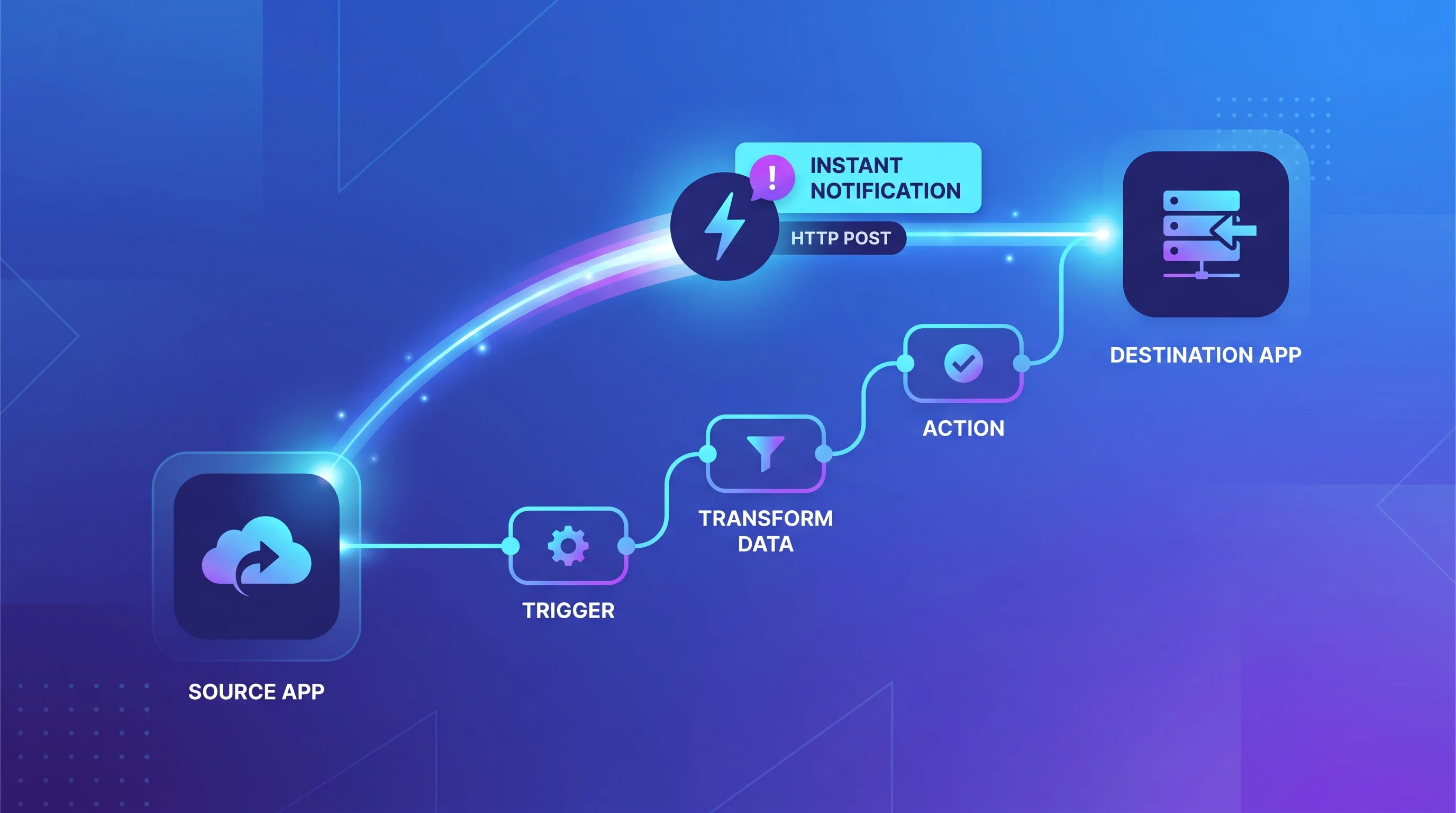
A webhook is an HTTP request one system sends to another the moment something happens, a new order, a form submission, a payment, instead of you having to ask for that information on a schedule. Webhook automation is what you build on top of that: a workflow in a tool like n8n, Make, or Zapier that listens on a URL, and the second a webhook lands, runs whatever steps come next.
That is the opposite direction from a typical API call. With an API, your system reaches out and asks a question, then waits for an answer. With a webhook, the other system reaches out to you, unprompted, the instant its own event happens. Most real automations use both: an API pull when you need data on demand, and a webhook trigger when you need to react the moment something changes.
The appeal is speed. A polling-based automation that checks for new orders every 15 minutes can leave a customer waiting, while a webhook-triggered one reacts in the same second the order was placed. That is also exactly why most webhook guides stop at "connect the trigger to the action" and call the topic covered. The trigger firing instantly is the easy 90% of the job.
The part every tutorial skips: delivery is not guaranteed
Treat a webhook like a phone call that might not connect on the first dial, not like a message that's guaranteed to land. Three things go wrong constantly, and each one has a different fix.
Your platform might reject the event before your workflow ever sees it. Make's webhook queue size depends on your subscription: for every 10,000 credits licensed per month, you get up to 667 items in that webhook's queue, capped at a maximum of 10,000 items total. Once the queue is full, Make returns an HTTP 400 with "Queue is full" and the event is simply rejected rather than held for later. If the sending platform doesn't retry on its own, that event is gone.
Your automation might time out before it finishes responding. Zapier gives any single action, including a webhook step, 30 seconds to complete. A step that calls a slow third-party API or processes a large file can blow past that window, and Zapier's own documentation recommends an asynchronous callback pattern for exactly this reason, not a longer timeout, because there isn't one.
The same event might arrive more than once. Most APIs that send webhooks use what's called at-least-once delivery, meaning they would rather send a duplicate than risk silently losing an event. If your workflow isn't built to recognize "I've already processed this one," a duplicate webhook can double-charge a customer, double-book an appointment, or send the same notification twice.
Building in the safety net the platforms don't give you for free
n8n's Webhook node doesn't deduplicate incoming events automatically. The platform does include a Remove Duplicates node, and builders commonly pair it with the event ID a sender provides, checking new events against a short-lived store before letting the workflow continue. That has to be added deliberately; it is not the default behavior of a bare webhook trigger.
The standard idempotency pattern looks the same across n8n, Make, and custom-built endpoints:
- Step 1: Grab the sender's event ID from the incoming payload (most mature APIs, Stripe, GitHub, Shopify, include one).
- Step 2: Check that ID against a short-term store, a database table or a key-value cache, before running any action that changes data.
- Step 3: If the ID already exists, acknowledge the request and stop. If it's new, store it and continue.
- Step 4: Respond with a success status immediately, before any slow processing runs, so the sender doesn't interpret a slow workflow as a failed delivery and retry unnecessarily.
That fourth step matters more than it looks. A workflow that waits to respond until every downstream step finishes is effectively betting that nothing downstream will ever be slow, which is the same bet Zapier's 30-second timeout exists to punish.
Our workflow automation team builds this idempotency layer into every webhook-triggered workflow by default, specifically because the failure mode doesn't show up in testing, where every webhook arrives cleanly and once. It shows up weeks later, in production, the first time a client's payment processor has a slow afternoon and starts retrying.
When a webhook automation needs a bigger platform underneath it
A single webhook-triggered Zap or n8n workflow handles a surprising amount of volume before any of this becomes a real problem. The math changes once volume climbs or once the data needs to reliably reach many downstream systems rather than one or two.
As an illustration, a business processing 500 orders a day through a single webhook-triggered automation, concentrated around a few busy hours rather than spread evenly, could burn through a meaningful share of Make's 667-item-per-10,000-credit queue allotment in a single hour if the scenario runs any slower than the events arrive. That's not a reason to panic about any specific number; it's a reason to check your actual queue usage against your plan's limit before volume becomes a support problem instead of a planning one.
When that math stops working, the problem isn't the webhook, it's that a workflow tool built for a team automating a handful of processes is being asked to do a job built for centralized, audited, high-volume event routing. Our breakdown of the best iPaaS platforms for 2026 covers that next tier up and the pricing gap between it and a standard workflow tool, in case your webhook volume has already outgrown the category this post covers.
Next step
Map out every webhook your business currently depends on, the payment processor, the form tool, the CRM, the booking widget, and write down what currently happens if one of those events never arrives. If the honest answer is "nobody would notice until a customer complained," that's the gap worth closing first.
Tell our AI automation team which systems you're already connecting through webhooks, and we'll show you where a missed or duplicated event is quietly costing you time or money right now.