Best-in-class finance teams process their invoices for 78% less than everyone else, and do it 82% faster, according to Ardent Partners' research on AP performance.
That gap is the entire reason AP automation software exists. It is also the reason most of the buying advice online is useless to you.
Search "ap automation software" and every result is a list of the same twelve tools, written by a vendor selling one of them. Ramp, BILL, Stampli, Tipalti, and a dozen others take turns being ranked number one. None of those pages answers the question that actually decides your outcome: does your business need a packaged AP tool at all, or does it need automation built around the messy way your invoices really flow?
This guide answers that. Not which logo wins, but which kind of solution fits, and how to tell before you sign anything.
What AP automation software actually does
Strip away the branding and every AP automation platform does the same five things:
- Captures the invoice, from email, a portal, or a scan.
- Reads it, pulling vendor, amount, and line items with OCR or AI.
- Matches it against a purchase order and receipt, if you use them.
- Routes it for approval based on rules you set.
- Pays it, then writes the record back to your accounting system.
The pitch is simple: replace manual data entry and email-chain approvals with a system that does the boring work and leaves a clean audit trail. When your invoices are standard and your approval rules are simple, a packaged tool delivers that on day one, and it is often the right call.
The trouble starts at the edges.
The number that should drive the decision
Before you compare a single feature grid, calculate your current cost per invoice. Take the fully loaded hours your team spends on accounts payable, add software and error-correction costs, and divide by invoice volume.
Then look at the gap. Ardent Partners finds that best-in-class teams run their AP at 78% lower cost per invoice than their peers. If your number is high, that spread is real money sitting on the table.
Here is what closing it looks like as example math, so you can size your own case:
Illustrative example: A business processing 2,000 invoices a month at $10 each spends $20,000 monthly on AP. Cutting that to $4 an invoice saves $12,000 a month. Against that number, a tool at $89 per user per month, or a one-time build, is a rounding error.
That framing matters because it flips the question. The debate is not "which tool is cheapest." It is "what does the cheapest path to a low cost per invoice look like for my specific mess?" Sometimes that path is a packaged tool. Sometimes it is not.
Where off-the-shelf AP automation software wins
Buy the packaged tool when most of these are true:
- Your invoices are fairly uniform, from a stable set of vendors.
- Your approval rules are simple: one or two approvers, clear thresholds.
- You already run a mainstream accounting system the tool integrates with, like QuickBooks, Xero, or NetSuite.
- Accounts payable is a self-contained process, not one step inside a bigger operation.
- You want it live in weeks, not designed from scratch.
In that world, a platform like BILL earns its keep fast. Its published plans run from roughly $49 to $89 per user per month, which is trivial against even a modest per-invoice saving. You switch it on, connect your accounting system, and the boring work mostly disappears.
Where a workflow-automation build wins
Here is the decision the listicles skip, because no vendor makes money by telling you their category is the wrong fit.
Packaged AP tools are built for the average invoice flow. The moment your process is not average, you hit walls the seat price does not warn you about:
- The integration you need does not exist. Your ERP is niche, or the tool syncs headers but not the custom fields your accountant depends on.
- Your approvals are conditional. Route by department, then project, then a dollar threshold, then a specific person on leave this week. Rule engines inside packaged tools get rigid fast.
- AP is one link in a longer chain. The invoice has to update a project budget, trigger a client status in your CRM, decrement inventory, or notify a job in the field. A tool built only to pay bills cannot see those systems.
- Per-seat pricing punishes scale. Every approver who needs access is another monthly fee, forever.
This is where a general workflow automation layer changes the shape of the problem. Instead of buying a closed product, you build the flow on a platform like n8n, Make, or Zapier that can connect to anything with an API, on rules you define.
The capture and reading can still use best-in-class AI. The difference is what happens after: the invoice data flows into every system it touches, not just the ones a vendor decided to support. For a sense of the range of processes this covers beyond finance, our roundup of workflow automation examples walks through use cases by department.
What "wired in" actually looks like
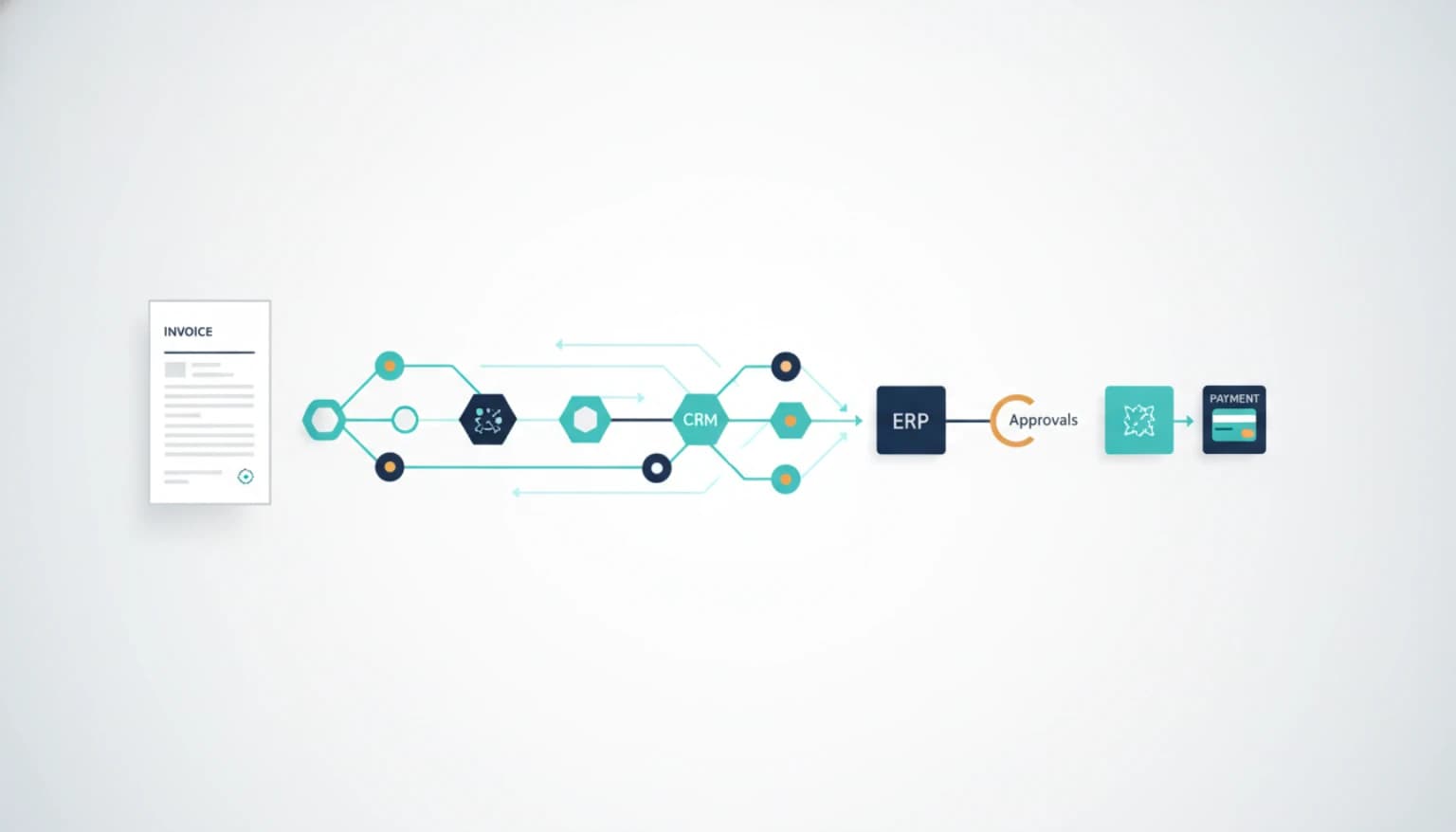
The abstract case for building sounds nice. Here is the concrete version, as a flow rather than a feature list:
Invoice arrives by email. An automation reads the vendor, amount, and line items.
It checks your CRM or project system to attach the invoice to the right client or job automatically.
It applies your real approval logic - the department-then-threshold-then-fallback rules a rigid tool cannot express - and pings the right approver in Slack.
On approval it writes to your accounting system, updates the project budget, and moves the client's status. On rejection it routes to a review queue with the reason attached.
No approver ever logs into a separate AP portal. The invoice does its job across your whole stack and disappears. That is the part a closed tool cannot reach, because it was never built to know your CRM or your project board existed.
If your CRM is the center of gravity, the same logic applies to keeping deal and billing data in sync, which is why teams often pair AP flows with broader AI automation work rather than treating finance as an island.
Three questions before you buy anything
Skip the feature grids. Ask these instead:
- Does a packaged tool integrate with every system my invoice data needs to touch? If yes, lean toward buying. If it covers accounting but not your CRM, ERP fields, or project tools, lean toward building.
- Can I express my real approval rules inside the tool, or do I have to simplify my process to fit it? Bending your business to fit software is a hidden, recurring cost.
- Is accounts payable a standalone task, or one step in a bigger workflow? Standalone favors a tool. Embedded favors a build.
Two "build" answers out of three, and a packaged tool will frustrate you within a quarter. Two "buy" answers, and a custom project is over-engineering.
The rough cost comparison
Reduced to its essentials, the tradeoff looks like this:
| Path | Cost shape | Best when |
|---|---|---|
| Packaged tool | Recurring, per user | Standard invoices, simple approvals, clean integrations |
| Workflow build | Setup fee, then usage | Complex rules, custom systems, AP as part of a bigger flow |
Per-seat pricing is quiet at five users and loud at fifty. A build carries more design cost up front and less per-person cost forever. Neither is universally cheaper, which is exactly why the "top 12 tools" framing leads so many teams to the wrong answer.
The decision rule
Buy AP automation software when a packaged tool already connects to every system your invoices touch and your approval rules fit inside it as-is. The day you find yourself simplifying your own process to fit the tool, or paying a seat fee for every approver, or copying invoice data by hand into a system the tool cannot reach, you have outgrown the category and should build the workflow instead.
The tool-versus-tool comparison everyone obsesses over is the easy 10% of this decision. The 90% is whether accounts payable stands alone in your business or lives inside something larger. Answer that first, and the shortlist picks itself.
If you would rather have that flow designed around the systems you already run - CRM, ERP, approvals, and all - our workflow automation team builds invoice processing that wires into your whole stack, not just your accounting tab. Book a call and we will map where your invoices actually go before recommending a single tool.