Type "operational CRM" into Google and you are almost certainly trying to answer one real question: which kind of CRM do I actually need, and is this the one? Every result gives you the same textbook split - operational, analytical, collaborative - and then leaves you to figure out which bucket your business falls into. So let us answer the question directly.
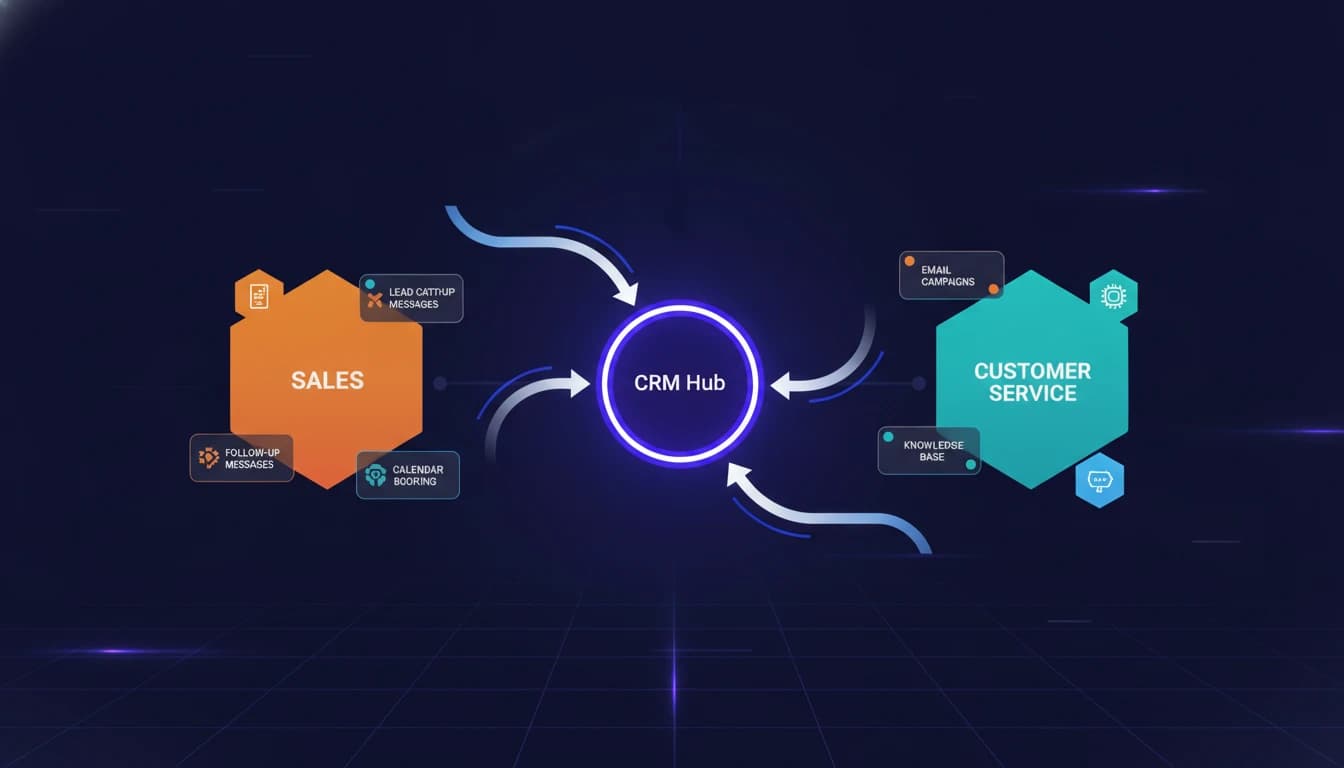
An operational CRM is the type of CRM whose job is to run the work, not just record it. It automates the repetitive, customer-facing steps across sales, marketing, and service: assigning a new lead, sending the follow-up, booking the call, moving the deal to the next stage, opening the support ticket. Salesforce, in its own breakdown, describes operational CRM as the type that "streamlines and simplifies a company's core business processes" by automating sales, marketing, and service workflows. That word - automating - is the whole distinction. The other two types describe what you do with the data an operational CRM captures.
If you feel the pain of leads going cold, appointments slipping, and quotes never getting chased, you do not have an analytics problem. You have an operations problem, and the operational CRM is the type built to fix it.
The three types, settled in one paragraph
You will see the operational-versus-analytical-versus-collaborative framing everywhere, so here it is, decided rather than explained:
- Operational CRM automates the doing. Pipelines, follow-up sequences, appointment booking, service tickets. This is the layer that changes what happens on Monday morning.
- Analytical CRM studies the data the operational side produces. Trends, forecasts, customer segments. Useful, but only once you have enough clean data flowing in to study.
- Collaborative CRM keeps everyone who touches the customer - sales, support, delivery - looking at the same record so nothing gets dropped in a handoff.
Here is the part the roundups bury: these are not three products you choose between. They are three jobs, and for most small and mid-sized businesses the operational job is the one that pays back first. You cannot analyze pipeline data you never captured, and you cannot collaborate on a record that does not exist. The operational CRM is what creates the data and the record in the first place. Zendesk makes the same point in its own definition, calling operational CRM the system that "automates and streamlines" the customer-facing processes the other types depend on.
What an operational CRM actually automates
The label "operational" is abstract. The value is not. A working operational CRM removes a specific list of manual steps that otherwise depend on a human remembering to do them. In practice that means:
- Lead capture and routing. A form fill, a missed call, or a chat message creates a contact and assigns it to the right person or pipeline automatically, in seconds, not the next time someone checks an inbox.
- Follow-up sequences. New leads get a timed series of texts, emails, or call tasks. The five-follow-ups-in-a-week that nobody has the discipline to do by hand happen on their own.
- Appointment booking. The CRM offers times, books the slot, sends reminders, and reschedules no-shows - closing the loop between "interested" and "on the calendar."
- Pipeline movement. Deals advance stages based on what the contact does, and stalled deals surface as tasks instead of quietly dying.
- Service and retention. Tickets open, route, and escalate; renewals and check-ins fire on schedule so existing customers do not churn from neglect.
Notice that none of these are reports. They are actions. That is the tell for whether a tool is genuinely operational: does it do something when a trigger fires, or does it just store the trigger for you to look at later?
How to know it is the type you need
Skip the feature grids for a minute and answer three questions about your business.
One: does your revenue depend on follow-up? If deals close because someone chases them on a schedule - most service businesses, agencies, home services, clinics, coaches - an operational CRM is not optional. The follow-up either happens automatically or it happens inconsistently, and inconsistent follow-up is the single most common place small businesses leak revenue.
Two: are people the bottleneck, or is insight the bottleneck? If your team knows what to do but cannot keep up with doing it, you need operational automation. If your team is doing everything but you cannot tell what is working, you need analytics. Most businesses under a few million in revenue are in the first camp and mistakenly shop for the second.
Three: how many tools are you stitching together? If you have a form tool, a calendar tool, an email tool, and a spreadsheet pretending to be a pipeline, an operational CRM's real value is collapsing those into one system where the handoffs are automatic instead of copy-paste.
If you answered "follow-up matters, people are the bottleneck, and I am juggling too many tools," you are not shopping for a CRM in general. You are shopping for an operational one specifically.
The money is in the setup, not the software
Here is what the definitional posts never tell you: buying an operational CRM and getting operational results are two different projects.
The market is enormous and growing precisely because businesses keep buying these tools. Grand View Research valued the global CRM market at 73.40 billion dollars in 2024 and projects 163.16 billion by 2030, a 14.6 percent compound annual growth rate. But a large share of those licenses sit half-configured. The CRM is technically "operational," and yet the follow-ups are not built, the pipeline stages are guesses, and the automations were never turned on.
An operational CRM only automates the workflows you actually design into it. Out of the box it is an empty engine. The payback comes from mapping your real sales and service process - the triggers, the timing, the branches for when a lead replies versus goes quiet - and wiring those into the platform. That is the work, and it is where most implementations stall.
Consider the math as an illustration. If a business books 40 leads a month and follows up with 30 of them by hand, the 10 that slip through at even a 20 percent close rate and a 1,000-dollar deal value is 2,000 dollars of lost revenue every month - far more than the CRM subscription. Automating the follow-up so all 40 get worked is not a software purchase; it is recovering that leak. The number is hypothetical, but the pattern - the tool costs less than the deals it saves - is the real reason operational CRM pays back.
Where GoHighLevel fits
Ask "is this an operational CRM" of the platforms our clients actually run, and GoHighLevel is a clean yes. Its center of gravity is operational automation: capture a lead from an ad or a form, drop it into a pipeline, run multi-channel follow-up across SMS, email, and voice, book the appointment, and chase the no-shows - all without a human driving each step. It reports too, but agencies and small businesses choose it for the operational layer.
That is exactly why it is our platform of choice for businesses that want a CRM that acts rather than records. Setting one up well is the difference between an empty engine and a machine that works every lead the same way every time. If you are weighing platforms, our honest GoHighLevel review and our GoHighLevel vs HubSpot comparison both go deeper on where it fits and where it does not.
For the businesses whose operational needs run past a single platform - custom integrations, data flowing between systems that were never meant to talk - the operational CRM becomes one node in a wider automation. That is where a CRM setup shades into broader workflow automation and, when the steps need judgment rather than fixed rules, into AI automation. And if you plan to resell the platform under your own brand, our guide to a white-label CRM covers that path.
Your next move
You now have the answer you came for: operational CRM is the type that automates the doing, it is almost certainly the type your business needs first, and the results live in the configuration, not the logo on the login screen.
So do one concrete thing this week before you shortlist a single vendor. Write down the exact path a new lead takes through your business today - from the moment they raise a hand to the moment they buy - and mark every step that currently depends on a person remembering to act. That list is your automation spec. Every item on it is a workflow your operational CRM should own.
When you have that list, talk to our GoHighLevel automation team. We will take your lead path, map it to an operational CRM built on GoHighLevel, and wire up the capture, follow-up, and booking so the leak closes - so the tool you buy actually runs the work instead of just storing it.